EFFECTS // UNITY
How to make fire in Unity
In Unity, you can play a looping fire, from a burning wreck to a fire whirl or a window fire. Your agent makes PNG sprite sheets of 64 frames, and the Particle System's Texture Sheet Animation, with Tiles set to 8 by 8, plays them as a loop.
- Godot 4 Available
- Unity Manual setup
- Unreal Engine Manual setup
- Roblox Studio Manual setup
- three.js Available
A draft compile is from $0.05, and new accounts start with $5 of usage.

01 // WHAT YOU GET
What you get for fire in Unity
Three fire examples come ready to start from. The steady fire is about 1.5 m across and reads as a burning wreck or a large campfire. The fire whirl spins its flames into a column 7 m tall. The window fire vents flame and smoke out of a burning room. All three loop every 2 seconds.
Each compile is four 2048 px PNG sheets of 64 frames on an 8 x 8 grid, a layout.json with the timing, and previews. The sheets carry lighting from six directions and the flame separately, not one painted color image, so Unity needs a small material to show them.
02 // BY HAND TODAY
Set up the fire in Unity by hand
- Ask your agent for the effect (for example "a campfire about 1 m across that loops") and download the output folder. Import
main_pos.png,main_neg.pngandmain_colour.pngwith Wrap Mode set to Clamp and Alpha Is Transparency off. They are data your material reads, not finished pictures, and the alpha ofmain_neg.pngholds flame brightness, which that option would treat as transparency. - Make a material for a Particle System. The quick setup uses the alpha of
main_pos.pngas opacity and its green channel (light from above) as brightness, tinted with your smoke color, and adds the flame on top:main_colour.pngtimes the squared alpha ofmain_neg.pngtimesscales.emit_max_hdrfromlayout.json. Shader Graph's Flipbook node or a small custom shader can read the sheets. - In the Texture Sheet Animation module, set Mode to Grid, Tiles X and Y to 8 and Animation to Whole Sheet.
- Turn Looping on, set Start Lifetime to 2 s and keep Frame over Time a linear curve from 0 to 1 with Cycles 1 (the curve is normalized over the particle's lifetime), so each particle plays the fire loop once per lifetime and new particles keep it going.
- Keep the particle square and set its size to the meters per tile in
layout.json, a little over 7 m for the fire, so it shows at its real scale.
03 // REAL OUTPUT
Compare the fire examples
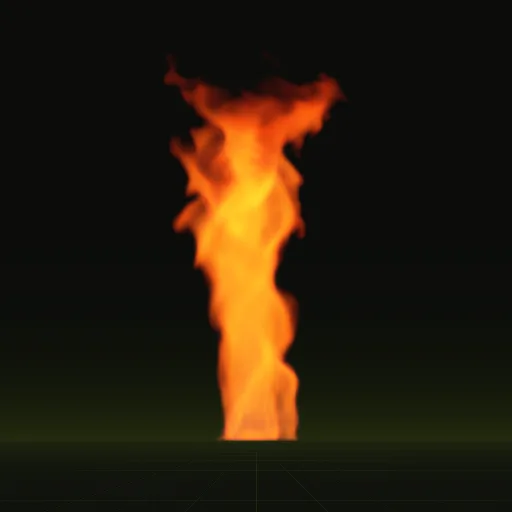
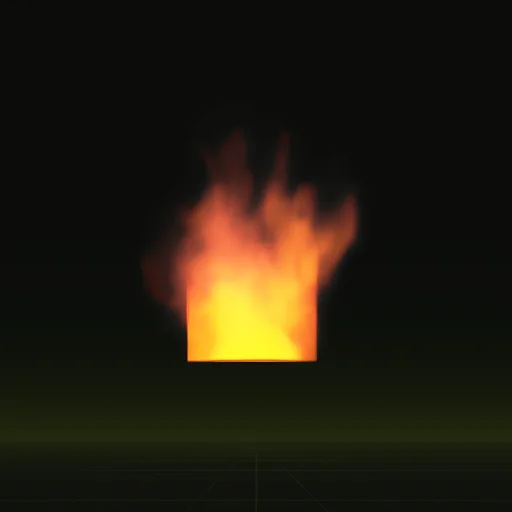
These clips are final-quality compiles of the shipped examples, played from their own sheets. Your agent can start from any of them.
04 // ADJUST IT
Adjust the fire for your scene
Pick the example closest to your scene and ask your agent to change it: a smaller fire for a torch-lit hall, darker smoke for burning oil, or a new seed when two fires sit side by side and should not match.
Each loop runs for as long as the scene needs it, so one compile covers a fire that burns for the whole level.
05 // WHICH ONE
Pick a fire example
fire: A steady fire about 1.5 m across, like a burning wreck. Loops, 4.1 x 7.0 m, 2 s loop.fire_whirl: Flames spun into a tall column by a vortex force. Loops, 4.4 x 7.1 m, 2 s loop.window_fire: A burning room venting flame and smoke through a window. Three obstacles make the building. Loops, 3.9 x 4.7 m, 2 s loop.
Each one has its own page: Fire, Fire whirl, Window fire.
Is there a ready fire effect for Unity?
Start from fire, fire_whirl or window_fire and ask your agent for a looping 1 m campfire. Animate the resulting sprite sheet in Unity.
How do I import a fire flipbook texture into Unity?
Import the PNG sheets, set Wrap Mode to Clamp, leave Alpha Is Transparency off and set Texture Sheet Animation to an 8 by 8 grid.
How do I randomize the starting frame of fire particles in Unity?
Set Start Frame to Random Between Two Constants from 0 to 63 in Texture Sheet Animation. Every frame is a valid loop start.
How do I make the flame glow without lighting the smoke in Unity?
Render flame and smoke on two layers. Put main_colour.png times squared main_neg.png alpha on an additive unlit material with scales.emit_max_hdr.
Should the first and last frames of a Unity fire loop match?
Yes. The fire compile blends its last 12 frames into its first so frame 64 leads smoothly back to frame 1 every 2 s.
Compile your first effect
You pay per compile and see the price before it runs. New accounts start with $5 of usage.