SPRITE SHEET // FIRE
Fire sprite sheet for your game
You get a looping fire as a sprite sheet: 64 frames on an 8 x 8 grid, 2048 px square, repeating every 2 seconds without a visible jump. Ask your agent for the fire you need, such as a burning wreck or a room on fire, and it compiles the sheet for you. Godot 4 plays it with no setup.
- Godot 4 Available
- Unity Manual setup
- Unreal Engine Manual setup
- Roblox Studio Manual setup
- three.js Available
A draft compile is from $0.05, and new accounts start with $5 of usage.

01 // WHAT YOU GET
Three fire loops, each 2 seconds long
Each fire is its own compile with its own sheets, and all three repeat every 2 seconds at 32 frames a second.
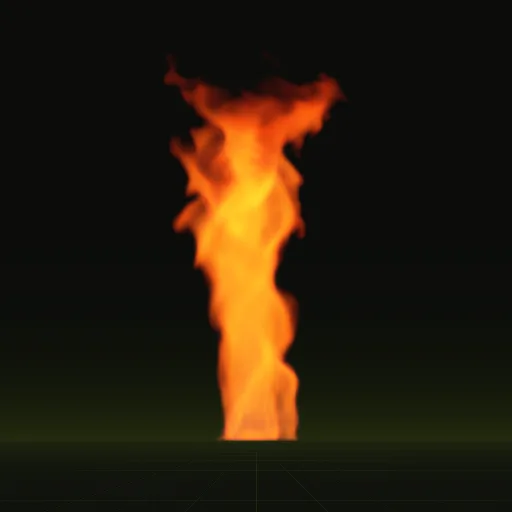
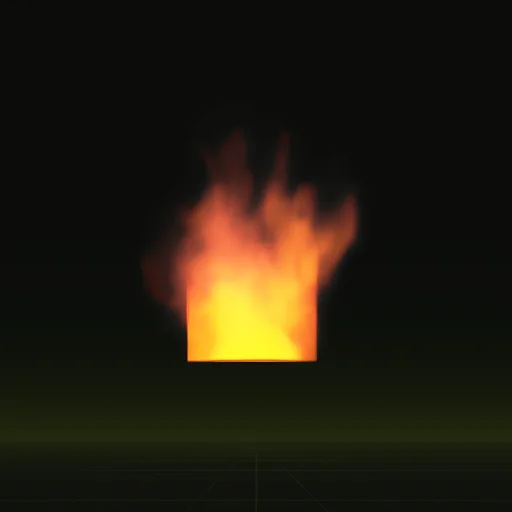
fire: a steady fire about 1.5 m across, up to 4.1 x 7.0 m with its smoke, for a burning wreck or a large campfire.fire_whirl: flames spun into a tall column, up to 4.4 x 7.1 m, for a wildfire or a set piece.window_fire: a burning room venting flame and smoke through a window, up to 3.9 x 4.7 m, for a building on fire.
Every compile writes four PNG sheets of 2048 x 2048 px plus layout.json, a small file with the grid, the frame times, the loop flag and the size in meters. See what each file holds.
02 // LIGHTING
Why a fire sheet comes as four images
A painted fire sprite sheet has one light direction drawn into its smoke, so it looks wrong when your sun sits on the other side. These sheets use six-way lighting, lighting precomputed from six directions so the smoke can be relit. Two sheets hold the six directions and the opacity, a third holds the flame color, and a fourth holds motion and depth.
The flame is stored apart from the smoke and added as light, so the core stays white-hot while the smoke above it follows your scene's sun.
03 // HOW TO
Ask your agent for a fire sheet
- Connect your agent to Spatial Compiler with an API key, using MCP, the protocol your agent uses to call tools.
- Describe the fire: what is burning, how wide it is, and that it should loop. For example, a fire on the hood of a wrecked truck, about 2 m wide.
- Your agent starts from the closest example, compiles a quick draft, checks the preview, then compiles the final sheets (from $0.10 a compile).
- Ask for changes in plain words, such as taller flames, darker smoke or a new seed for a second fire that does not match the first.
- In Godot 4, ask your agent to wire the compile into your project. You get a scene with the fire on a quad sized in meters, ready to drop into a level.
04 // ENGINES
Play it in Godot 4 or another engine
In Godot 4 the scene plays on its own. Its shader lights the smoke from your DirectionalLight3D and adds the flame as HDR light, so WorldEnvironment glow can bloom it. See fire in Godot 4.
In Unity, Unreal Engine, Roblox Studio and three.js you can play the same PNG sheets today with the engine's own flipbook settings, 8 columns by 8 rows. Take opacity from the alpha of main_pos.png, and add the flame, main_colour.png times the squared alpha of main_neg.png times scales.emit_max_hdr from layout.json, with additive blending.
What is a fire sprite sheet?
A fire sprite sheet is one image holding every frame of a fire animation in an 8 by 8 grid so your engine plays it cell by cell.
How many frames should a fire effect use?
64 frames cover a 2 second fire loop at 32 frames a second. Request a different grid if a small fire needs fewer frames.
Can I use a fire sprite sheet in Unity?
Yes. Set the Particle System Texture Sheet Animation module to Mode Grid and Tiles 8 by 8, then read the sheets with a shader.
How do I make a fire flipbook glow without lighting the smoke?
Draw flame and smoke as separate layers. Flame sits in main_colour.png and main_neg.png alpha for additive blending while smoke uses normal alpha blending.
Does the fire flipbook play in Godot?
Yes. Your agent wires the compile into a Godot scene that loops with the lighting shader and code can drive it using time_s.
Compile your first effect
You pay per compile and see the price before it runs. New accounts start with $5 of usage.