LEARN // EFFECTS
What are billboard particles
Billboard particles are flat quads that turn to face your camera every frame, so a 2D image of fire, smoke or dust looks like a solid shape from any angle. Your engine rotates each quad for you, and the texture on it, usually a flipbook frame, supplies all the detail the effect shows.
- Godot 4 Available
- Unity Manual setup
- Unreal Engine Manual setup
- Roblox Studio Manual setup
- three.js Available
A draft compile is from $0.05, and new accounts start with $5 of usage.

01 // HOW IT WORKS
Three ways to face the camera
A billboard costs four vertices, so one effect can draw hundreds of them. The illusion breaks when the camera looks straight down on an upright quad, or where the quad cuts into a wall and its flat edge shows.
- Full billboard: the quad faces the camera plane, the usual choice for smoke and sparks.
- Vertical billboard: the quad turns only around the up axis, so fire and foliage stay upright when you look down on them.
- Velocity aligned: the quad stretches along the direction of travel, for sparks, rain and tracer streaks.
02 // IN YOUR ENGINE
The setting in each engine
- Godot 4: Billboard Mode on
StandardMaterial3D(Enabled, Y-Billboard or Particle Billboard). Use Particle Billboard for flipbooks. - Unity: Render Mode in the Particle System's Renderer module (Billboard, Stretched Billboard, Horizontal Billboard, Vertical Billboard).
- Unreal Engine: Facing Mode and Alignment on the Niagara Sprite Renderer.
- Roblox Studio:
ParticleEmitter.Orientation(FacingCamera, FacingCameraWorldUp, VelocityParallel, VelocityPerpendicular). - three.js:
THREE.Spritealways faces the camera.
03 // REAL OUTPUT
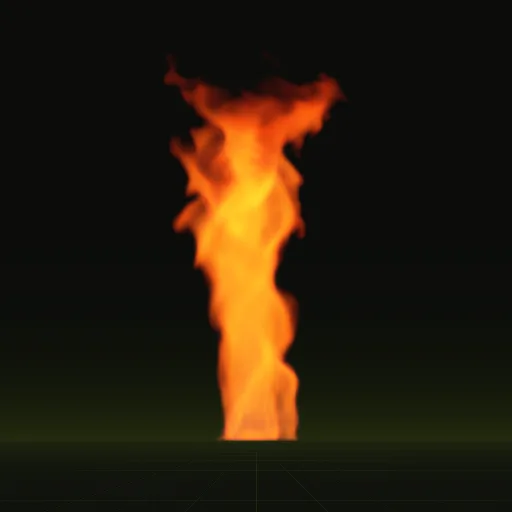
Flames made for upright billboards
Both flames were precomputed from the side, so they suit a vertical billboard that stays upright as the camera moves.
04 // SPATIAL COMPILER
Why the compiles fit a billboard
Each compile is rendered by an orthographic camera, side-on by default, so every frame maps onto a flat quad without perspective distortion. Every tile is square, so keep the quad square too, sized from metres_per_tile in layout.json, which also records the ground anchor point. In Godot 4 the scene your agent writes is a quad sized in meters with its origin on the ground, and wire can write a GPUParticles3D for many copies. See Godot fire.
How do I orient three.js fire and smoke sprites toward the camera?
Use THREE.Sprite with SpriteMaterial to face the camera automatically or rotate a plane mesh around its Y axis toward the camera each frame.
How do I make smoke particles face the camera correctly in 3D?
Set the material to face the camera using Particle Billboard in Godot, Billboard in Unity or Face Camera in Niagara.
How do I prevent smoke particles from looking like flat square billboards?
Use soft irregular edges, randomize rotation and size, fade quads near geometry and use six way lit sheets for realistic shading.
How do I orient dust particles to the floor using GPUParticles3D?
Turn off billboarding on the material and use a flat draw pass mesh such as a PlaneMesh facing upward.
How do I play an explosion sprite sheet on a billboard in Godot?
Assign the sheet to a StandardMaterial3D with Particle Billboard and Particles Anim H Frames and V Frames on a one shot GPUParticles3D.
Compile your first effect
You pay per compile and see the price before it runs. New accounts start with $5 of usage.