How to repair an STL file
To repair an STL, you close its holes, flip faces that point inward and remove stray faces, so your slicer sees one sealed shell. Blender does all of it for free with a few menu commands. On a test file we broke on purpose, the steps fixed all 98 broken edges.
pyrofx effects work today, and new accounts start with $5 of usage.
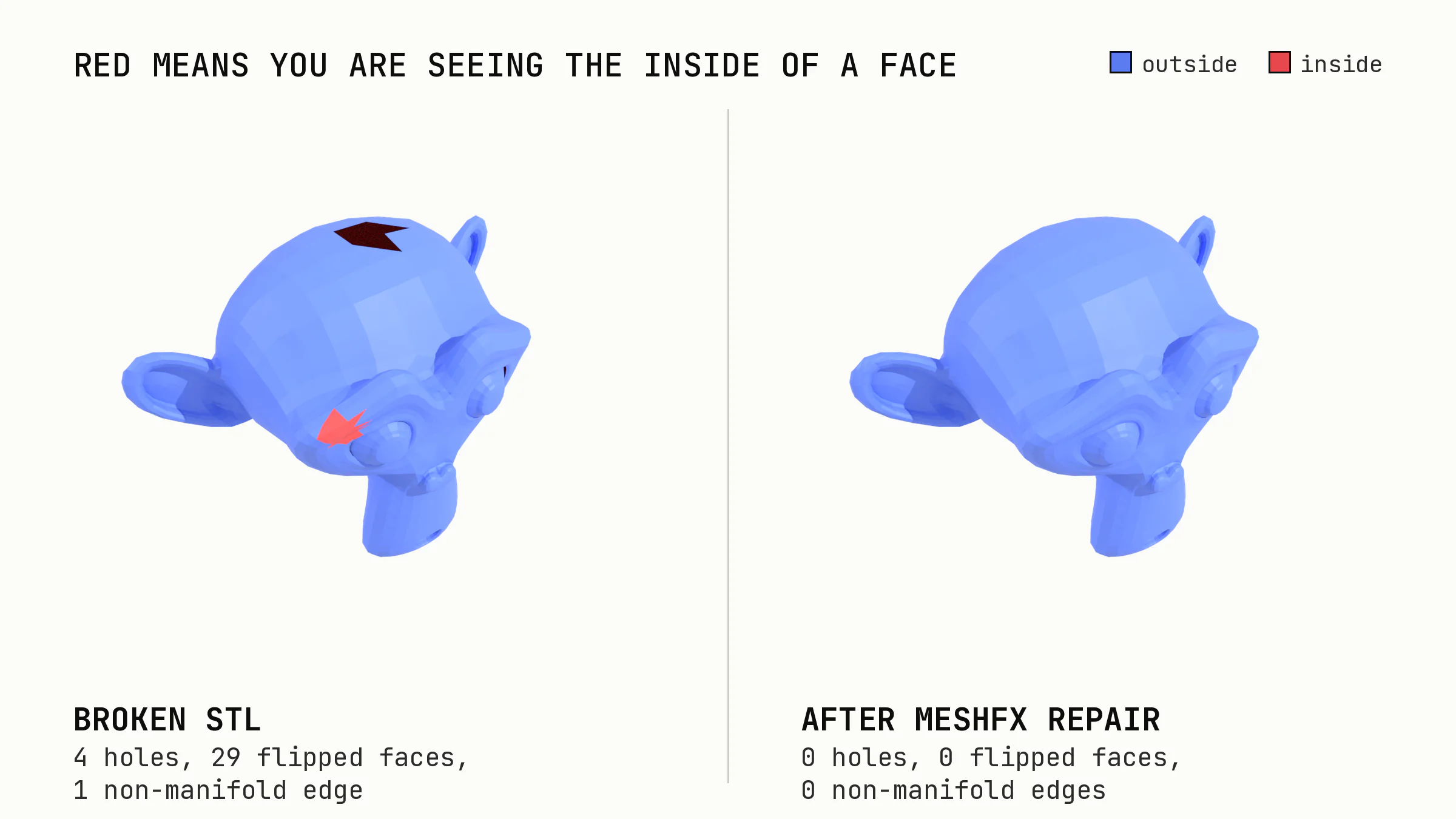
What a broken STL file looks like
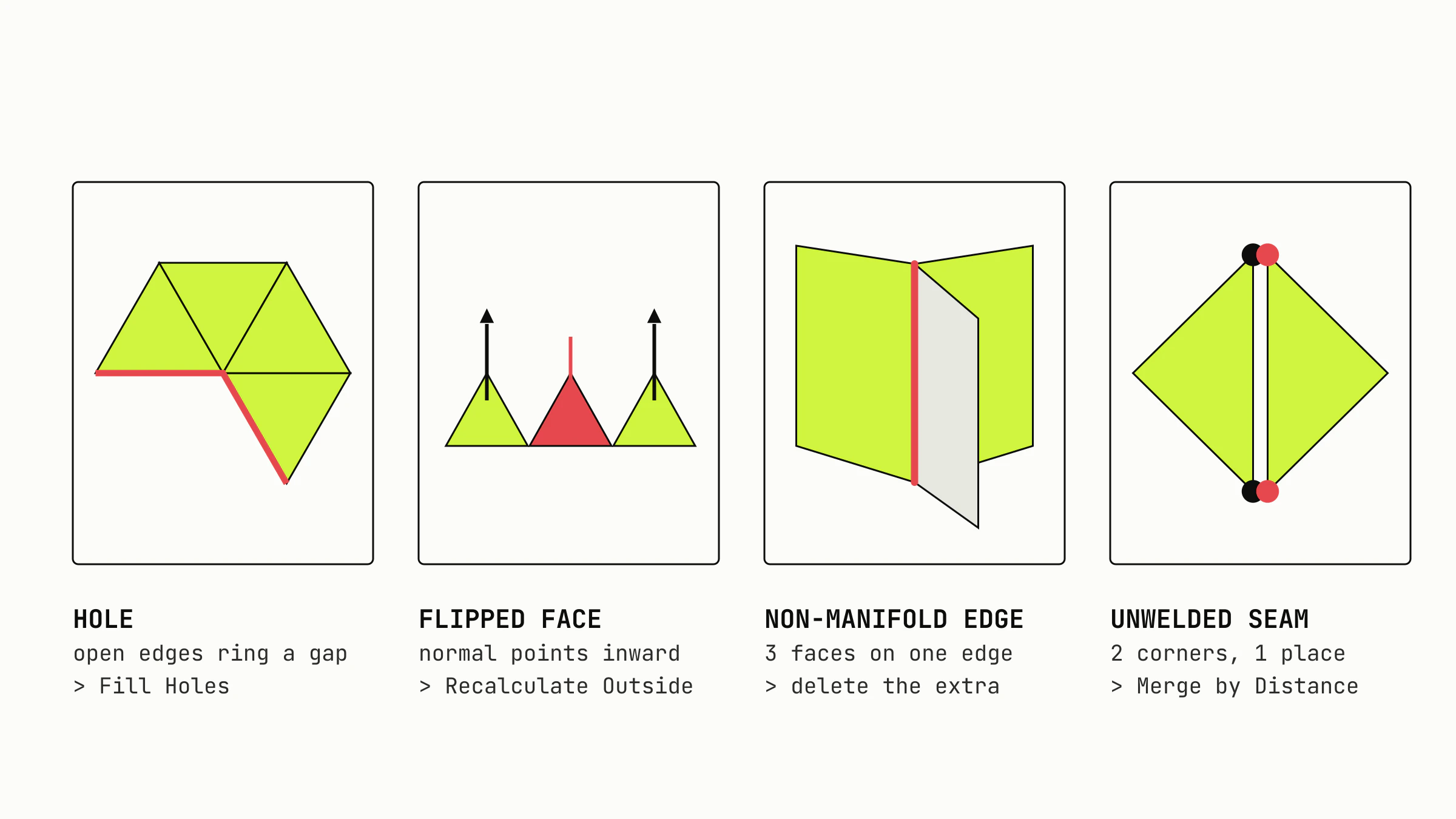
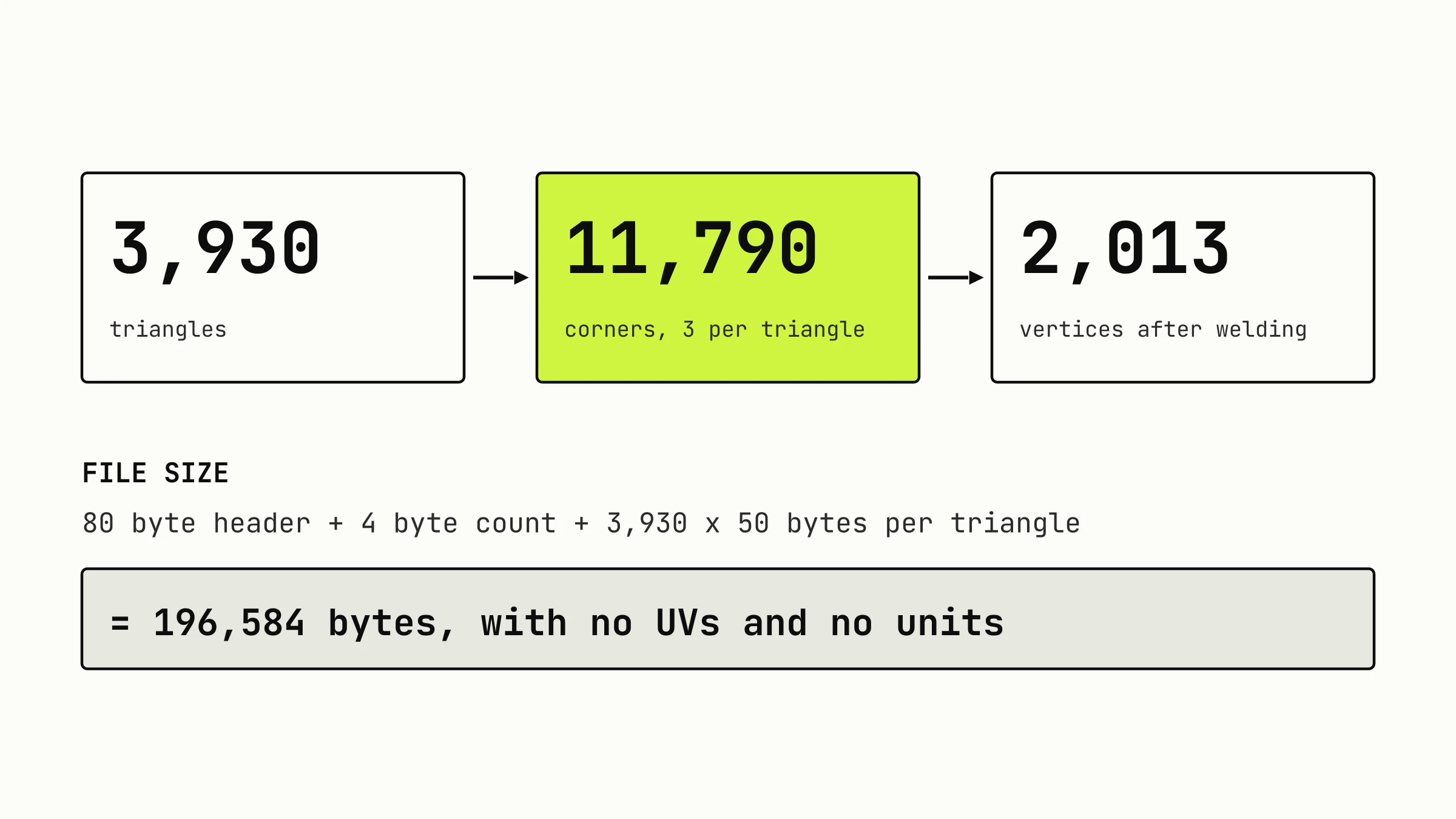
An STL file is just a list of triangles, with no textures, colors or units. Each triangle saves its own three corners, so the file never says which triangles touch. Your slicer has to work that out, and it fails when the surface has gaps or edges that don't line up.
A printable model is watertight, meaning it's one sealed shell. Every edge is shared by exactly two faces, and edges that break that rule are called non-manifold. Every face also has to point outward. Four common faults break these rules, and most broken files have more than one.
We broke a test file, then fixed it
We took Blender's monkey head and broke it on purpose. We punched two holes in it, flipped 29 faces on one cheek inside out and stuck a stray triangle onto one edge. Then we saved it as an STL.
We ran the broken file through meshfx with its default repair and compared the reports from before and after.
| Check | Broken STL | After meshfx repair |
|---|---|---|
| Triangles | 3,930 | 3,985 |
| Holes | 4 | 0 |
| Inside-out faces | 29 | 0 |
| Edges with an extra face | 1 | 0 |
| Open edges | 97 | 35 |
| Separate parts | 3 | 4 |
Two of the 4 holes were ours. The other 2 are the eye sockets, which are open in Blender's original head. The 35 open edges left belong to the eyeballs, which are open by design, and to the stray triangle. The repair split that triangle off as its own part.
meshfx checks every repair step against the original surface. None of the steps moved it enough to be undone.
How to repair an STL in Blender
- Import the file with File, then Import, then STL. Select it and press Tab to enter Edit Mode.
- Press A to select everything, then press M and choose By Distance to weld corners that should be joined. On our test file it removed nothing, because the importer already joins exact matches. On files with tiny gaps, it closes the cracks.
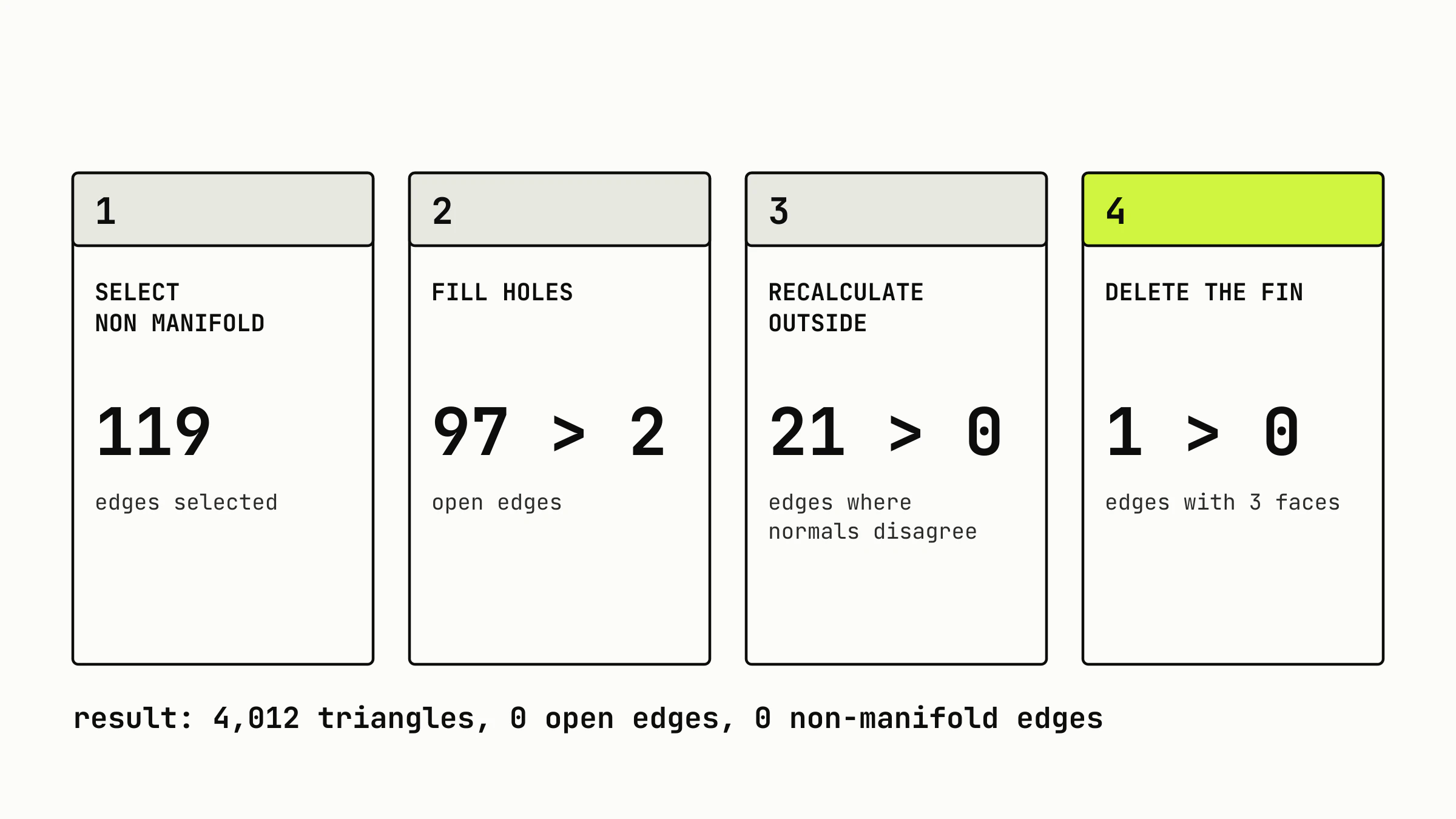
- Press Alt+A to deselect, press 2 to select edges, then choose Select, then Select All by Trait, then Non Manifold. Blender highlights every problem edge. On our file, it found 119, including the edges around the flipped faces.
- Press A, then choose Mesh, then Clean Up, then Fill Holes. In the Adjust Last Operation panel, set Sides to 0 so it fills holes of any size. On our file, only 2 open edges were left.
- Turn on Face Orientation in the Viewport Overlays menu. Blue faces point out and red faces point in. Press A, then Shift+N to make every face point out. The 29 red faces turned blue.
- Run Select Non Manifold again. Click any face still attached to a highlighted edge, like the stray triangle here, press X and choose Faces. Repeat until nothing is highlighted.
- Export with File, then Export, then STL. Our fixed file had 0 open edges and 0 non-manifold edges.
Which fix each STL fault needs
| Fault | How you spot it | Blender fix |
|---|---|---|
| Hole | Select Non Manifold highlights a ring of open edges | Mesh, then Clean Up, then Fill Holes with Sides at 0. Or select the ring and press F. |
| Inside-out faces | Red patches with Face Orientation on | Select all, then Shift+N |
| Non-manifold edge | An edge stays highlighted after you fill holes | Delete the extra face, or split it off with P |
| Unwelded corners | Cracks along edges, or far more vertices than you expect | M, then By Distance |
| Parts that cross | Shapes pass through each other and the slicer shows extra walls | A Boolean union, or the Remesh modifier set to Voxel |
| Thin walls | Walls thinner than your nozzle disappear in the slicer preview | A Solidify modifier |
Repair STL files with meshfx
meshfx reads STL, OBJ, PLY and glTF files. It finds holes, inside-out faces and non-manifold edges, then repairs them one step at a time. After each step it compares the result with your original and undoes any step that changes the shape too much. The before and after numbers came from its report. Hosted meshfx runs are available in the Playground.
meshfx writes GLB files for Godot, Unity, Unreal, Roblox and three.js, not STL. To print, open the repaired GLB in Blender and export it as STL.
STL files don't say which way is up. Files from Blender and most CAD tools use Z as up, so set up = "z" in your spec, or the model lands on its back.
[source]
file = "monkey_broken.stl"

# STL from Blender is Z up.
[units]
up = "z"

# Keep every triangle and run the default repair.
[simplify]
triangles = 0

[uv]
mode = "keep"

[bake]
source_detail = false

[collision]
mode = "none"

[export]
targets = ["godot"]
To fail the run when a fault survives repair, add fail_on = ["OPEN_HOLES", "NON_MANIFOLD_EDGES"] under [budget]. Every key is in the meshfx spec reference.
Let your agent repair the STL
Paste this prompt into Claude Code, Cursor or Codex. Your agent connects to Spatial Compiler and comes back with a repaired GLB and a report of the holes, flipped faces and non-manifold edges before and after.
New accounts start with $5 of usage, and you see the price of each job before it runs.
Connect the Spatial Compiler MCP server at https://spatialcompiler.dev/mcp if it isn't connected yet. Use meshfx to repair my STL file and give me the repaired GLB. Show me the price before it runs.
Or add the server yourself in Claude Code:
claude mcp add --transport http spatial-compiler https://spatialcompiler.dev/mcp
Questions about repairing STL files
How do I repair an STL file in Blender?
Import it, select non-manifold edges, fill holes with Sides set to 0, press Shift+N to fix flipped faces, delete stray faces and export. If the file has cracks, weld corners first with M, then By Distance.
How do I repair an STL file for 3D printing?
Make it watertight, meaning one sealed shell with every face pointing out. Fill holes, fix flipped faces and remove extra faces, then check that thin walls don't disappear in your slicer.
How do I clean up an STL in Blender?
Weld corners with M, then By Distance. Then use Mesh, then Clean Up, then Delete Loose to remove stray points, and Degenerate Dissolve to remove faces with no area. Fill holes and fix normals last.
What is a free tool for repairing STL files?
Blender is free and covers every fix: Select Non Manifold, Fill Holes, Recalculate Outside and Merge by Distance. Most slicers also repair small holes and flipped faces on their own when you import.
Can I repair an STL file online?
Yes, several sites repair STL files in the browser. They fix holes and flipped faces automatically, but they don't show you what changed. Check the result in Blender with Face Orientation and Select Non Manifold before you print.
Why isn't Blender recognizing my STL file?
Use File, then Import, then STL, because File, then Open only reads .blend files. If it imports and you can't see it, it may be tiny or huge, since STL has no units. Press Numpad period to zoom to it.
Can AI repair STL files?
Automatic repair tools can. They follow fixed rules, since a hole is either closed or open and a face points out or in. meshfx runs those rules on STL files, measures the result and writes GLB.