What is texel density
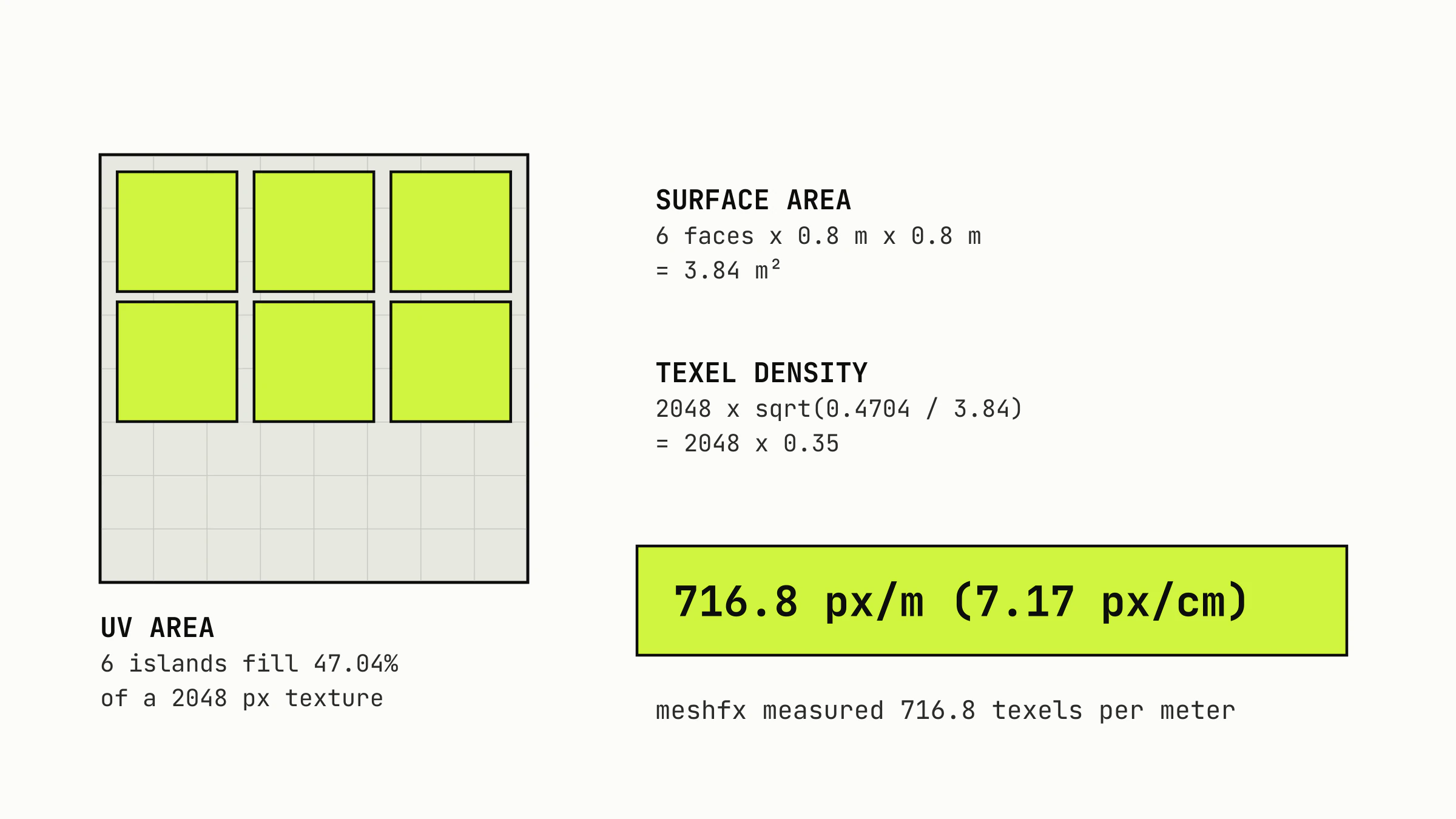
Texel density is how many texture pixels land on each meter of your model. Keep it about the same across a scene and nothing looks blurrier than its neighbors. You get it from your texture size, how much of the texture you use and the model's size. Our 0.8 m test crate gets 716.8 pixels per meter.
pyrofx effects work today, and new accounts start with $5 of usage.
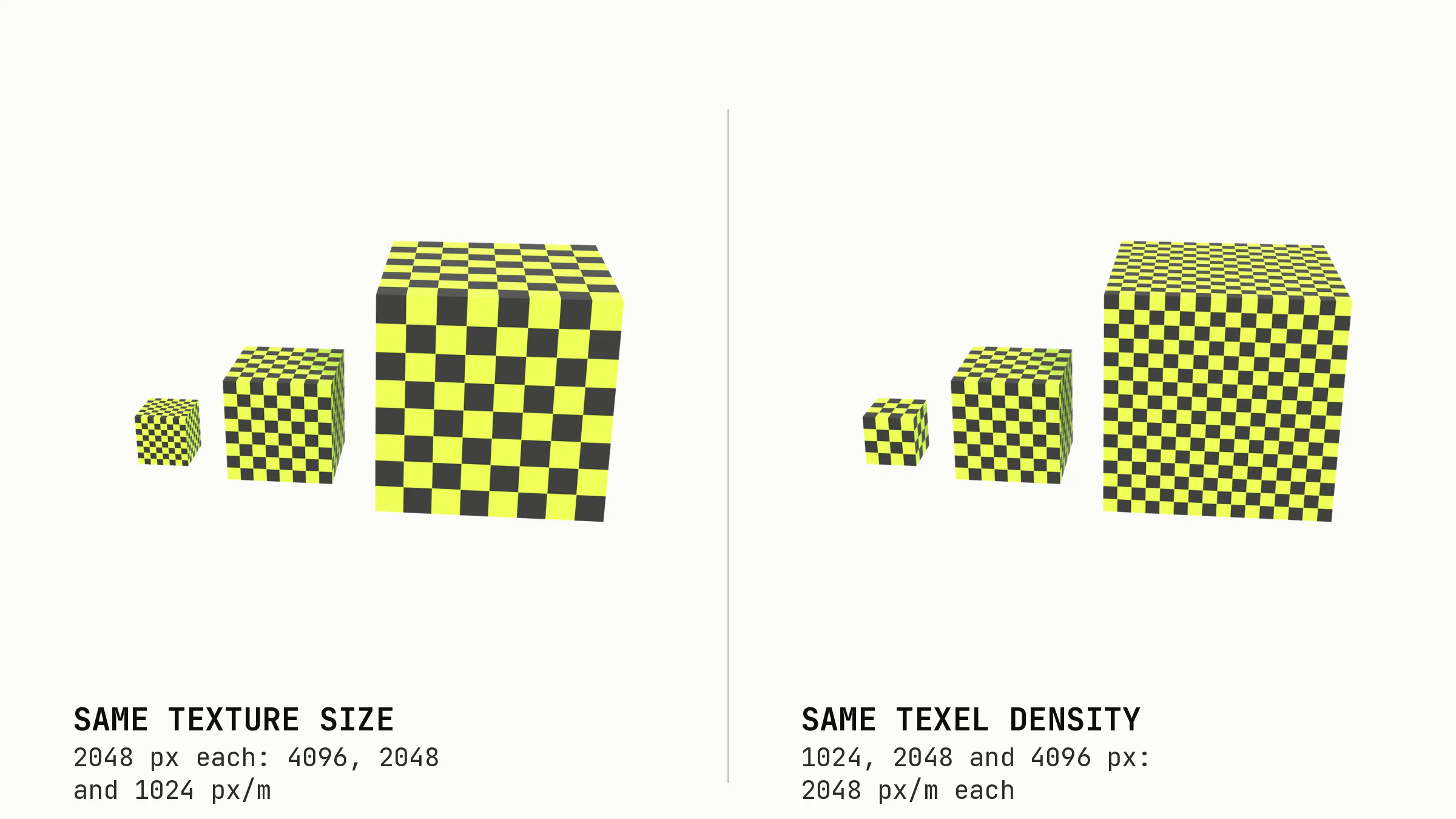
Why texel density matters
A texel is one pixel of a texture once it's wrapped onto a model. Texel density counts how many texels cover one meter of surface, written as px/m.
Players notice when density jumps: a sharp crate next to a blurry wall, or a character whose hands look sharper than its face. Keep density close for everything the camera sees at the same distance, and the whole scene looks equally sharp.
Calculate the texel density of a crate
You need three numbers: the texture's width in pixels, how much of the texture your UV islands cover, and the model's surface area. Divide the coverage by the area in square meters, take the square root and multiply by the texture width. You take the square root because density is measured along a line, while area covers a square.
Our test crate is a 0.8 m cube. Its 6 sides add up to 3.84 m², and its islands cover 47% of a 2048 px texture. That works out to 716.8 px/m, the same number the meshfx report gives.
| Texture | Texel density | In px/cm |
|---|---|---|
| 1024 px | 358.4 px/m | 3.58 |
| 2048 px | 716.8 px/m | 7.17 |
| 4096 px | 1,433.6 px/m | 14.34 |
Packing tighter helps too. If the crate's islands covered 64% of the texture, it would get 836 px/m. To go much higher, use a bigger texture.
Common texel density targets
No engine sets a standard, so treat these as starting points. Pick one for your project and keep everything at the same camera distance close to it.
| Game type | Texel density | In px/cm |
|---|---|---|
| Mobile, top down or strategy | 256 to 512 px/m | 2.56 to 5.12 |
| Third person | 512 to 1024 px/m | 5.12 to 10.24 |
| First person and VR | 1024 to 2048 px/m | 10.24 to 20.48 |
Props the player picks up or inspects often get twice your target. Terrain and far-off buildings often get less, with a repeating detail texture on top.
How to check texel density in Blender
- Select your model in Object Mode. The script reads the object's scale, so you don't need to apply it first.
- Open the Scripting workspace, click New and paste the script.
- Set SIZE_PX to the width of the texture this model uses, then click Run Script.
- Read the result in the system console. On Windows, choose Window, then Toggle System Console. On Mac and Linux, it's the terminal you started Blender from.
- If density is too low, pack the islands tighter or use a bigger texture. If one part looks blurry, select its islands in the UV Editor, scale them up and repack.
import bpy, bmesh, math

SIZE_PX = 2048  # your texture's width in pixels

obj = bpy.context.active_object
bm = bmesh.new()
bm.from_mesh(obj.data)
bm.transform(obj.matrix_world)
uv = bm.loops.layers.uv.active
uv_area = surface = 0.0
for face in bm.faces:
    surface += face.calc_area()
    pts = [loop[uv].uv for loop in face.loops]
    for i in range(1, len(pts) - 1):
        a, b, c = pts[0], pts[i], pts[i + 1]
        uv_area += abs((b.x - a.x) * (c.y - a.y) - (c.x - a.x) * (b.y - a.y)) / 2
bm.free()
density = SIZE_PX * math.sqrt(uv_area / surface)
print(f"{obj.name}: {density:.1f} px/m at {SIZE_PX} px ({uv_area:.1%} of the square, {surface:.2f} m2)")
On the 0.8 m crate it prints 716.8 px/m at 2048 px. Blender's default 2 m cube prints 256.0 px/m.
How texture size, model size and packing change density
- Double the texture width and density doubles. The crate goes from 716.8 to 1,433.6 px/m at 4096 px.
- Double the model's size with the same texture, and density halves.
- Pack your islands tighter and density goes up with no new pixels. See UV packing.
- Scale one island up in the UV Editor and only that part gets sharper. Do it on purpose for faces players see up close.
- Repeating textures work differently. Multiply the texture width by how many times it repeats per meter, so a 1024 px texture that repeats every 2 m gives 512 px/m.
Check texel density on every model with meshfx
Every meshfx report measures texel density on your model: the average, and the least detailed 10% of the surface. If that 10% gets less than a quarter of the average, the report warns you, which catches an island squeezed into a corner. Hosted meshfx runs are available in the Playground.
Add the warning to your spec's budget and the run fails instead, so a model with uneven detail can't reach your game. The UV unwrapping example shows the warning on a real unwrap.
[source]
file = "crate.glb"

[simplify]
triangles = 5000

# Keep your UVs and measure them on every level.
[uv]
mode = "keep"

# Fail when part of the surface gets under a quarter of the mean density.
[budget]
fail_on = ["TEXEL_DENSITY_LOW", "UV_OVERLAP"]
Every report field and spec key is in the meshfx spec reference.
Let your agent check your UVs on every LOD
Paste this prompt into Claude Code, Cursor or Codex. Your agent connects to Spatial Compiler and comes back with a GLB with LODs on your UVs and a report that measures every level.
New accounts start with $5 of usage, and you see the price of each job before it runs.
Connect the Spatial Compiler MCP server at https://spatialcompiler.dev/mcp if it isn't connected yet. Use meshfx to make 3 LODs of my model that keep its UVs, and report texel density, overlaps and stretch. Show me the price before it runs.
Or add the server yourself in Claude Code:
claude mcp add --transport http spatial-compiler https://spatialcompiler.dev/mcp
Texel density questions
What is a texel?
A texel is one pixel of a texture once it's wrapped onto a 3D model. Up close, one texel can fill many pixels on your screen. Far away, many texels share one.
How do you calculate texel density?
Divide how much of the texture your islands cover by the surface area in square meters. Take the square root and multiply by the texture width. A 0.8 m crate covering 47% of a 2048 px texture gets 716.8 px/m.
How do I check texel density in Blender?
Run a short script that adds up UV area and surface area, like texel_density.py in the steps. A UV Grid texture also shows uneven density at a glance, because the squares change size.
How do I set texel density in Blender?
Measure the current density, then scale the islands in the UV Editor by your target divided by that number. A scale of 0.5 halves it. Repack afterward so nothing overlaps.
What size should a texture be?
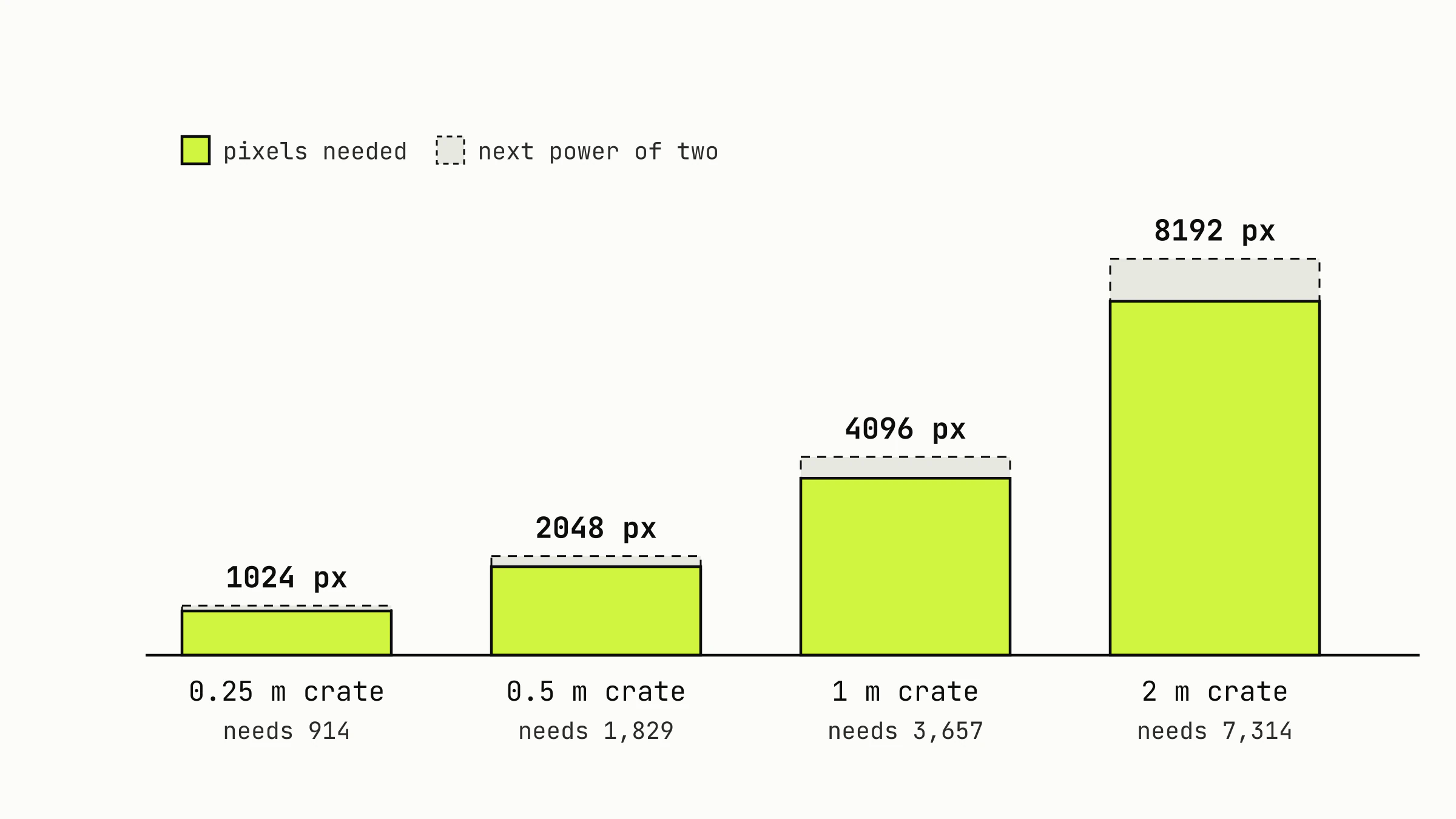
Work back from your target density. A 1 m crate at 1024 px/m that covers 47% of its texture needs about 3,657 px, so use 4096 px. Stick to powers of two.
What texel density should I use?
Common starting points are 256 to 512 px/m for mobile and top-down games and 512 to 1024 px/m for third person. First person and VR start at 1024 to 2048 px/m. Pick one per project and keep your models close to it.